
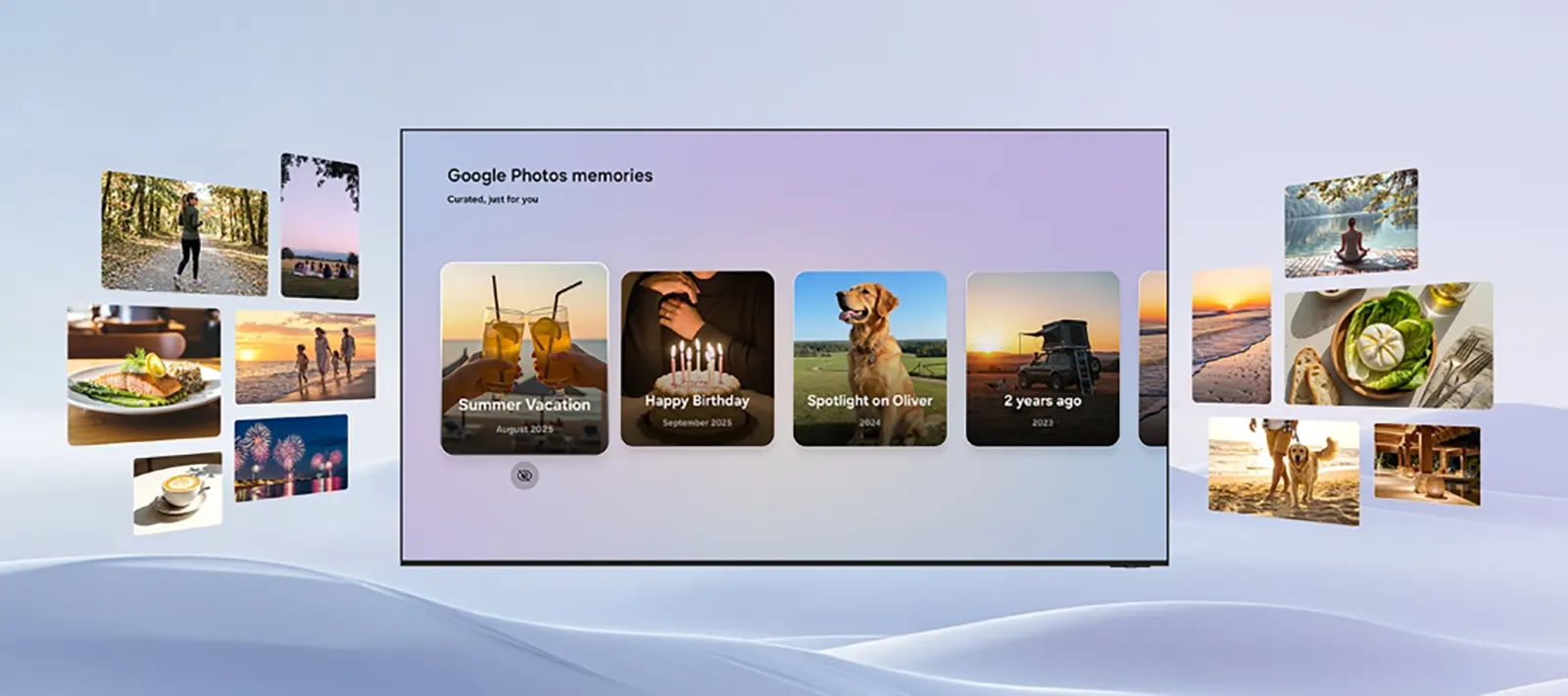
Google Photos Coming to Samsung TVs in 2026: Everything You Need to Know. Google Photos is officially making the jump to the big screen. In a major move for the smart home ecosystem, Google Photos will integrate directly with Samsung TVs starting in 2026. Samsung aims to bridge the gap between mobile photography and home entertainment, allowing users to view their personal libraries in a “larger, cinematic format.”
“Samsung TVs have always brought people together, and bringing Google Photos to the big screen makes that experience even more personal,” said Kevin Lee, Executive Vice President at Samsung Electronics.
Google Photos Coming to Samsung TVs in 2026: Everything You Need to Know
Currently, there is no native Google Photos app available for any smart TV platform—not even Google TV. This partnership marks a significant milestone in making Google’s cloud storage deeply woven into the Tizen OS experience.
Roadmap for New Features
The rollout is planned in two major phases throughout 2026:
- March 2026 – “Memories” Launch: Samsung TVs will first receive a dedicated Memories feature. This will showcase curated collections of photos and videos. Notably, this feature will remain a Samsung exclusive for six months before potentially expanding to other manufacturers.
- H2 2026 – Generative AI and Search: The second half of the year will introduce advanced tools, including:
- Create with AI: Utilizing the Nano Banana model to offer themed templates.
- AI Editing Tools: Access to Google’s Remix and Photo to Video tools directly on the TV.
- Personalized Results: A smart slideshow feature that lets you display images based on specific topics like “hiking,” “beach,” or “Paris.”
Simple Setup and Integration
Samsung has prioritized user experience, ensuring that the integration is seamless. Users will simply sign in with their Google Account on their Samsung TV to automatically sync and display their Google Photos library. While Samsung is the first to announce this, the end of the exclusivity period suggests that LG, Sony, and other TV providers may follow suit later in 2027.
| Feature | Google Photos (Mobile) | Google Photos on Samsung TV (2026) |
| Display & Format | Small screen, primarily portrait/vertical orientation. | Cinematic Format, optimized for large 4K/8K landscape displays. |
| User Experience | Personal and individual browsing. | Social & Family-oriented, designed for shared viewing in the living room. |
| System Integration | Standalone mobile application. | Deeply Woven into Tizen OS, Daily Board, and Daily+. |
| Artificial Intelligence | Basic editing (Magic Eraser, etc.). | Nano Banana (Google DeepMind), featuring Remix and Photo to Video. |
| Memory Delivery | Push notifications on your phone. | Vision AI Companion, featuring contextual and automatic daily highlights. |
| Search & Navigation | Manual keyword or face search. | Personalized Results, automated slideshows by theme (e.g., “Paris,” “Hiking”). |
| Exclusivity | Available on all Android/iOS devices. | 6-month Exclusive launch for the “Memories” feature on Samsung TVs. |
Why This Shift Matters:
- From Utility to Decor: On mobile, Google Photos is a utility tool for storage. On the Samsung TV, it becomes a dynamic digital art gallery that enhances your home’s aesthetic.
- AI-Powered Creativity: The integration of the Nano Banana model means your TV isn’t just displaying files; it’s an AI creative suite capable of turning static memories into stylized art and short films.
- Passive Discovery: With Daily Board, you don’t have to go looking for your photos. Your best memories will naturally surface to greet you as you move through your home, making the technology feel more human and less “digital.”
Frequently Asked Questions (FAQ) – Google Photos on Samsung TV
1. Will Google Photos work on my current Samsung TV? The full integration and advanced AI features (like Nano Banana) are confirmed for 2026 models and beyond. However, Samsung’s recent commitment to the Tizen OS Upgrade program suggests that premium models from 2024 and 2025 may receive some of these features via future software updates.
2. Is my privacy protected? Will everyone see all my photos? Privacy is a top priority for both Google and Samsung. The integration requires a manual sign-in with your Google Account. Additionally, you will have the ability to select specific albums for display, ensuring that sensitive or private photos do not appear in the living room unless you choose to share them.
3. Is there a subscription fee for this service? The integration itself is expected to be free for all Samsung TV users with a valid Google Account. While basic features are free, some advanced generative AI features might eventually require a Google One subscription, similar to how certain AI tools function on the Google Photos mobile app today.
4. Can I edit photos directly on the TV? Yes! Using the new AI-powered tools like Remix and Photo to Video, you can transform your images using only your TV remote. These features allow you to change art styles or animate still photos into short video clips without needing a phone or PC.
5. What if I own a different TV brand (LG, Sony, etc.)? Samsung has a 6-month exclusivity agreement for the “Memories” feature starting in early 2026. Once this period expires (likely in the second half of 2026 or early 2027), Google is expected to roll out similar integrations for other platforms like Google TV (Sony/TCL) and webOS (LG).
6. Does my phone need to be near the TV for this to work? No. Once you have signed in on your TV, the images are pulled directly from the Google Cloud. Your phone does not need to be turned on or connected to the same Wi-Fi network for your photos and memories to appear on the screen.
